Layout
NimGui does not have a feature rich Layout Engine. If you are looking for a UI system with a complex layout engine, we recommend looking for a different solution.
That said, NimGui does contain a minimal layout engine to help determine where to render each widget. Internally, it keeps track of the last scope and any deltas.
What do we mean by "last scope?"
For example, let's say we did not create a Pane and wanted to draw a label.
void Update() {
    ImGui.Label("Hey I'm a label");
}
The label would appear in the top left corner like so.

We know we are drawing relative to the screen size. In the image above, the screen resolution is 1280x720p. As we continue to draw more elements by declaring more widgets, we keep track of the previous' widgets dimensions so that we can figure out the next widget's position.
The next widget's position is determined by subtracting the previous widget's height, such that the widgets will be positioned down the screen.
How does this affect Panes?
Panes allow you to declare a scope of a specific size. If you declare a scope of size of 500x500, then internally NimGui, will keep track of this scope until we are finished with the Pane. Panes by default will not update the last known scope's positions as panes are draggable and can overlap on top of other elements.
void Update() {
    ImGui.Label("Hey I'm a label");
    using (var pane = new ImPane("Pane", new float2(300), new float2(500, 500))) {
        if (pane.IsVisible) {
            ImGui.Label("Hey I'm a label in a new scope!");
        }
    }
    ImGui.Label("Hey I'm right underneath the first label!");
}
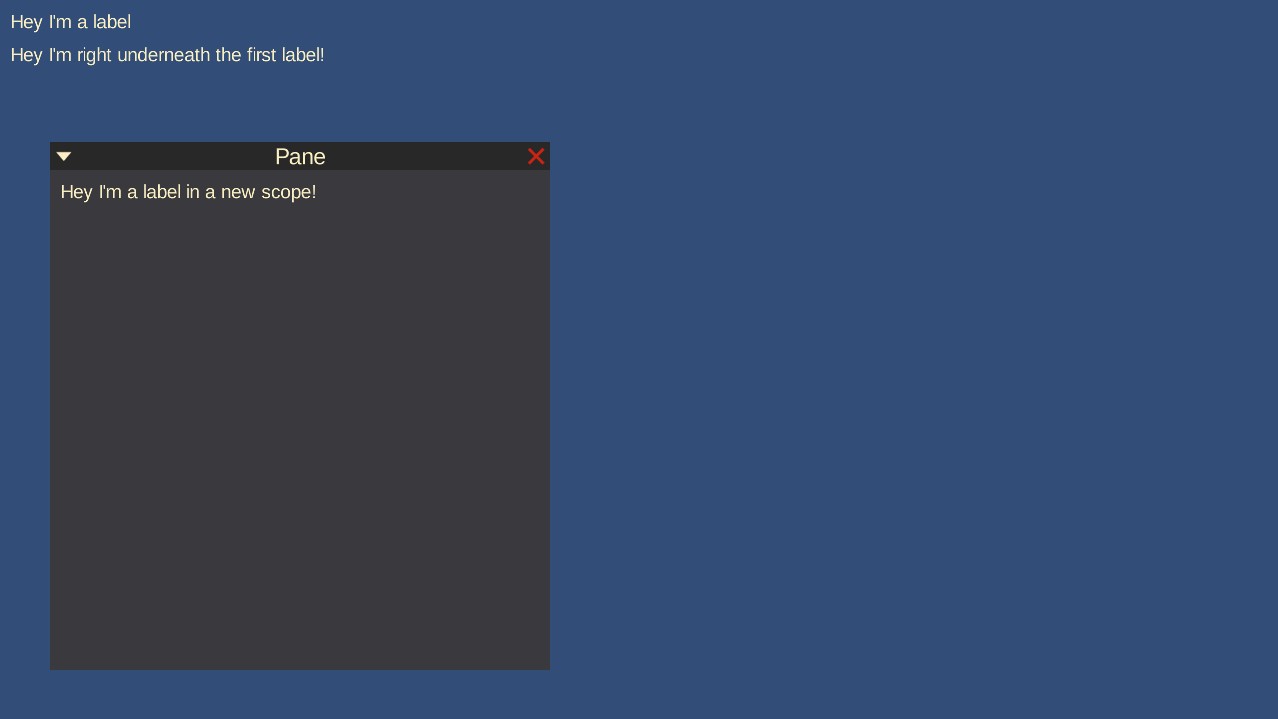
In the image above, we can see that
Hey I'm a label
is shown first. The label right underneath it,
Hey I'm right underneath the first label!
is actually drawn last because we declared our Pane as the middle elemenet. Panes do not update the current scope as they create a new scope to allow elements to be relatively drawn to it.
This is why our second label
"Hey I'm a label in a new scope!
in our example code, is drawn within the pane towards the bottom of the screen.
How does this affect ImGui.SameLine()?
ImGui.SameLine() reads the current scope and attempts to offset the the next widget position
to be on the same line. This is done by reversing the offset internally and shifting the position
by the previous widget's width.